


Select Field
Create powerful dropdown selection fields for your WooCommerce products with WPActPro’s Select Field option. Allow customers to choose from predefined options like service tiers, shipping methods, packages, or any structured choices directly on your product pages.
What is the Select Field?
The Select Field is a powerful dropdown input that lets customers choose from predefined options on your product pages. It is ideal for offering variations such as sizes, colors, service levels, packages, or any group of choices that require a single selection. Because the interface is familiar and simple to navigate, customers can make fast and confident decisions.
Each option can have its own pricing rules, making this field extremely flexible for both simple and advanced product setups. You gain full control over pricing while ensuring customers select only valid and structured choices. The Select Field is a scalable and user-friendly solution for any WooCommerce store that needs clean, organized input options.
Unlike standard WooCommerce product fields, Extra Product Options for WooCommerce’s Select Field includes advanced features that give you complete control over customer selections:
How To Use
- Navigate to the Products – Extra Product Addons – Product Option – Addon Builder
- Add Section or Element
- Select “Select” from the Element Popup
- Configure your settings including min/max values, step increment, and default value in Select Options Tab
- Set pricing rules if the number affects the product price
- Click On Done in the popup and click on Save
Why Use a Select Field?
Select fields serve multiple purposes in e-commerce, making them essential for various business models:
- Structured Choices: Present customers with clear, predefined options that ensure data consistency
- Easy Navigation: Dropdown interface is familiar and user-friendly – no learning curve required
- Flexible Pricing: Each option can have its own price, making it perfect for tiered pricing models
- Data Consistency: Ensures customers select from valid options only, reducing errors and improving data quality
- Scalable: Can handle many options without cluttering the interface – perfect for extensive product variations
- Mobile-Friendly: Works well on all devices and screen sizes with native dropdown functionality
Common Use Cases:
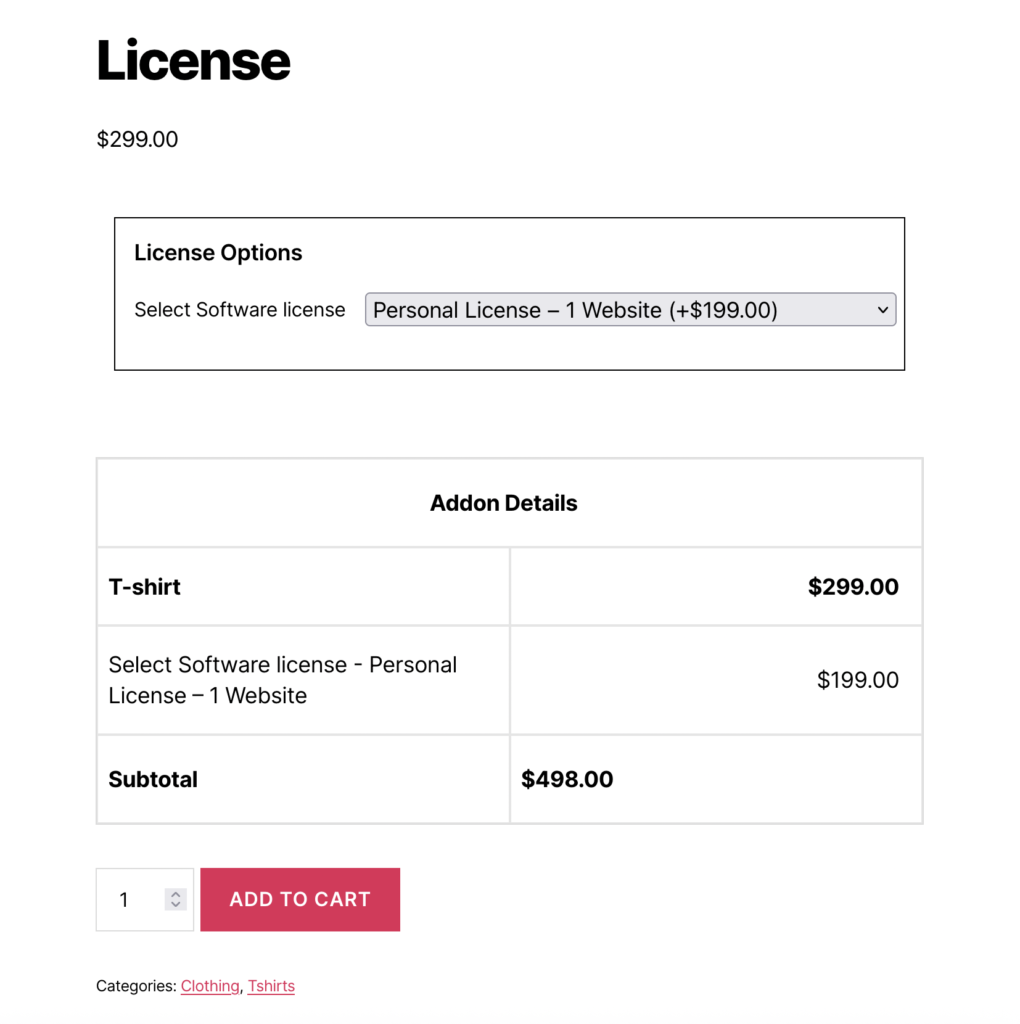
Software License Tiers: Perfect for digital products where customers need to choose between Personal, Business, or Enterprise licenses. Each tier can have different pricing and features, making it easy to upsell customers to higher tiers.
Shipping Options: Allow customers to select their preferred shipping method (Standard, Express, Overnight) with corresponding prices. This is especially useful for stores that offer multiple shipping speeds.
Service Packages: Ideal for service-based businesses where customers choose between Basic, Premium, or VIP service levels. Each package can include different features and pricing.
Product Variations: Perfect for products with multiple variations like sizes, colors, materials, or configurations. The dropdown keeps the interface clean while offering all necessary options.
Subscription Levels: Enable customers to choose between different subscription tiers (Monthly, Quarterly, Annual) with appropriate pricing for each option.
Add-on Services: Let customers select additional services like installation, warranty extensions, or premium support with individual pricing for each option.
WPActPro makes it easy to guide customers through structured choices while ensuring that each option can influence pricing, validation, and the final order. The Select Field works seamlessly with other field types, allowing you to build flexible and highly customized product configurations.
- For numeric input such as quantities or measurements, try our Number Field
- When you want customers to choose a single option, use our Select Field
- For situations where multiple selections are needed, the Multiselect Field is the best choice.
- To offer simple yes/no or on/off choices, use our Checkbox Field
- And when paragraph-style input is required, try our Textarea Field
When to Use the Select Field
The Select Field is perfect for these product types and scenarios:
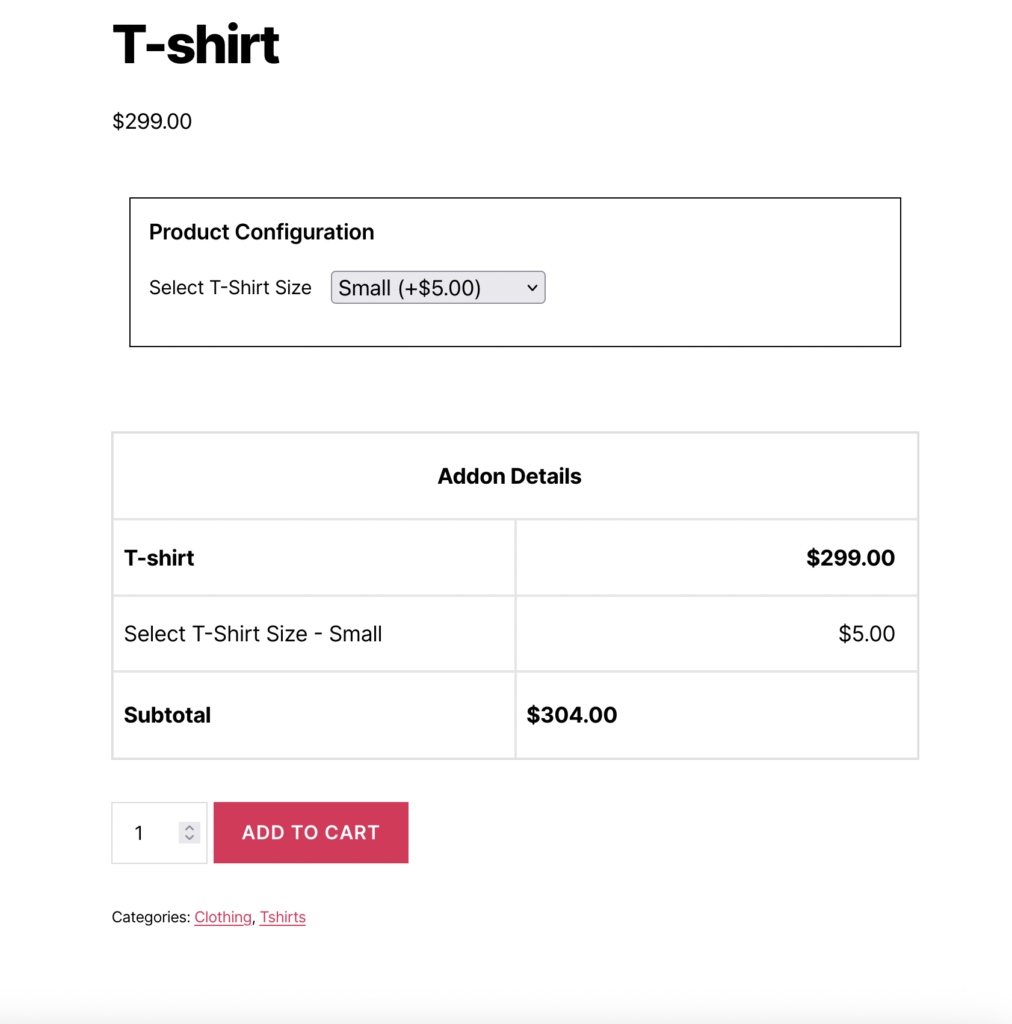
Single-Choice Product Variations
Select fields are ideal when customers need to choose one option from multiple alternatives, and each choice affects pricing or product configuration.
- License tiers (Personal, Business, Enterprise)
- Service levels (Basic, Premium, VIP)
- Shipping methods (Standard, Express, Overnight)
- Product sizes or configurations
- Subscription durations (Monthly, Quarterly, Annual)
Tiered Pricing Models
When you offer products with different pricing tiers based on features, capacity, or service levels, select fields provide a clean way to present these options.
- Software license tiers with different feature sets
- Service packages with varying levels of support
- Product bundles with different component combinations
- Membership levels with different benefits
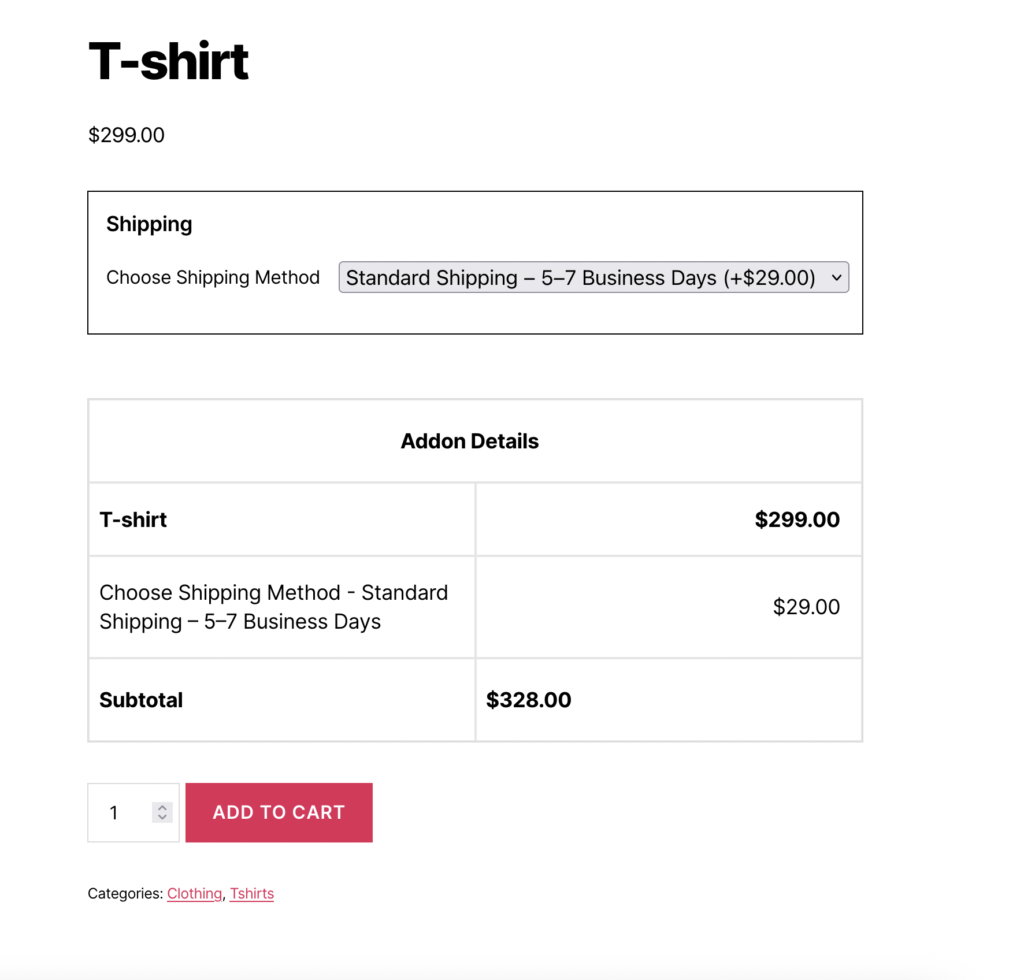
Shipping and Delivery Options
E-commerce stores use select fields to let customers choose their preferred shipping method, with each option having its own price and delivery time.
- Standard vs Express shipping
- Delivery time preferences
- Shipping carrier selection
- Delivery location options
How to Set Up the Select Field
Follow these comprehensive step-by-step instructions to add a Select Field to your WooCommerce products. This guide covers all essential settings organized into General Settings, Label Settings, and Select Options.
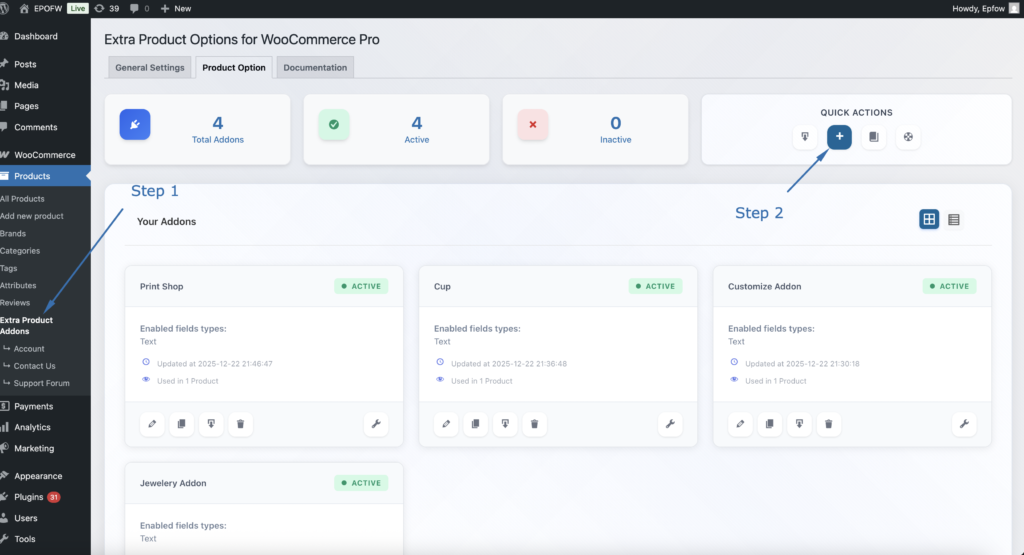
Step 1: Access the Field Builder
- In your WordPress admin, go to WooCommerce > Products > Extra Product Addons
- Click “Add Product Addon” or edit an existing addon
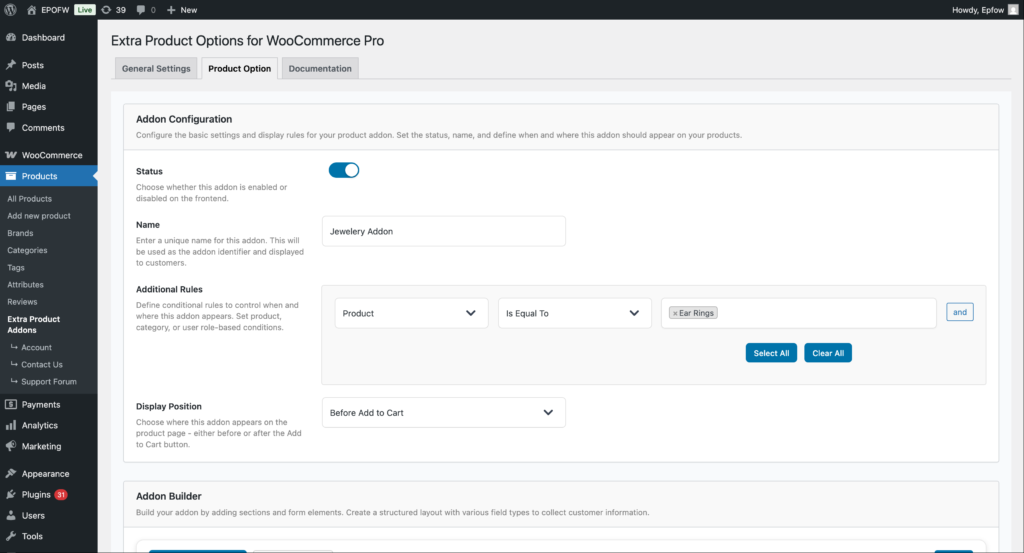
Addon Configuration:
- Status:
- Check the Status checkbox to enable the addon
- Unchecked addons are disabled and won’t appear on product pages
- Enable this to make your fields active
- Name:
- Enter a name for your addon (e.g., “Personalization Options”)
- This name helps you identify the addon in the admin area
- It’s not visible to customers on the frontend
- Additional Rules:
- Configure which products should display this addon
- Product: Select the condition type (Product, Category, Tag, etc.)
- Is Equal To: Choose the comparison operator
- Value: Select specific products, categories, or other criteria
- Use “Select All” or “Clear All” for bulk selection
- Click “and” to add multiple conditions
- Example: Apply to “Product” “Is Equal To” “Silver Ring” to show only on that product
- Display Position:
- Select where the addon fields appear on the product page
- Options include:
- Before Add to Cart (most common)
- After Add to Cart
- Choose the position that works best with your theme layout
Product addons help you organize your extra product options and apply them consistently across your store. Think of them as containers that hold multiple fields for specific products or product types.
Step 2: Add the Select Field
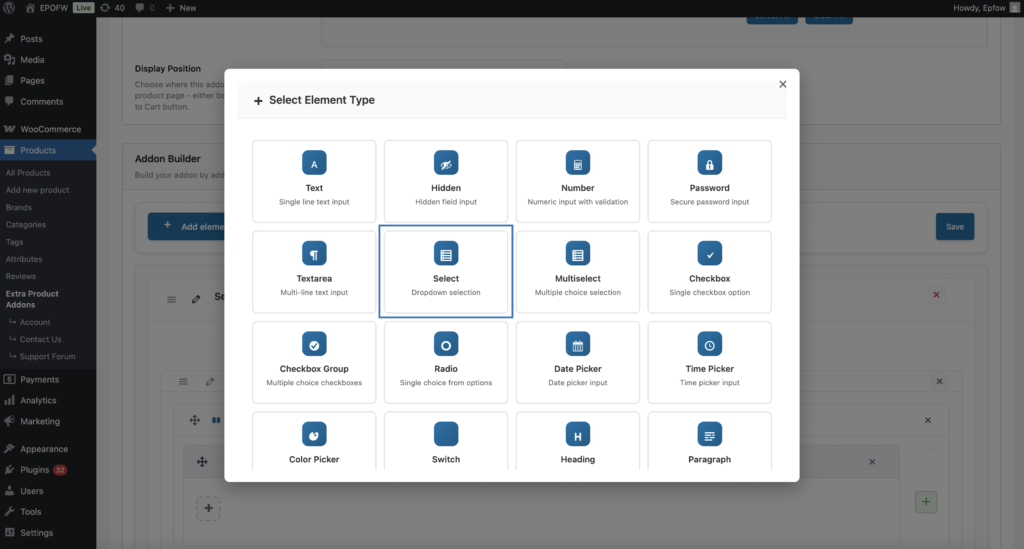
- In your Addon Builder, click “Add Element/Add Section -> ( + ) Add Element” button
- Select Select from Select Element Type modal popup
Step 3: Configure General Settings
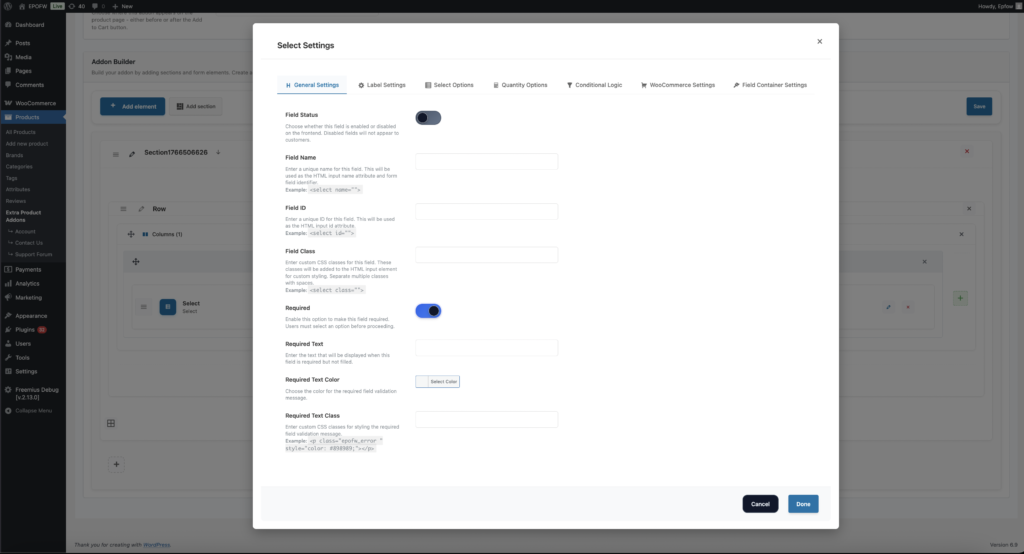
The General Settings tab contains basic field configuration options that control the field’s core functionality and behavior.
The field title is crucial because it’s the first thing customers see. Make it clear and specific to avoid confusion during checkout.
General Settings:
- Field Status:
- What it does
- Controls whether the field is enabled or disabled on the frontend.
- How to use:
- Enabled (ON): The field will be displayed to customers on the product page
- Disabled (OFF): The field will be hidden from customers but remains in your configuration
- Best practices:
- Keep fields enabled during testing to see how they appear to customers
- Disable fields temporarily if you need to make changes without affecting live products
- Use this setting to A/B test different field configurations
- What it does
- Field Name:
- What it does:
- Sets the HTML name attribute for the select field. This is used for form submission and data processing.
- How to use:
- Enter a unique name for the field (e.g., `license_type`, `shipping_method`, `package_tier`)
- The name will be automatically prefixed with `epofw_field_` if not already present
- Use descriptive names that indicate the field’s purpose
- Example:
- Field Name:
license_type - HTML Output:
<select name="epofw_field_license_type[value]">
- Field Name:
- Technical Details:
- Must be unique within the addon
- Only alphanumeric characters, underscores, and hyphens are recommended
- Used in form data processing and cart item meta
- What it does:
- Field ID:
- What it does:
- Sets the HTML id attribute for the select field. Used for CSS styling and JavaScript targeting.
- How to use:
- Enter a unique ID for the field
- The ID will be automatically prefixed with `epofw_field_` if not already present
- Use descriptive IDs that match your naming conventions
- Example:
- Field ID:
license_type - HTML Output:
<select id="epofw_field_license_type">
- Field ID:
- Best practices:
- Keep IDs consistent with field names for easier maintenance
- Use kebab-case or snake_case for multi-word IDs
- Ensure IDs are unique across all fields on the page
- What it does:
- Field Class:
- What it does:
- Adds custom CSS classes to the select field for styling purposes.
- How to use:
- Enter one or more CSS classes separated by spaces
- These classes will be added to the
<select>element - Use classes that match your theme’s styling conventions
- Example:
- Field Class:
custom-select premium-field - HTML Output:
<select class="custom-select premium-field">
- Field Class:
- Best practices:
- Use semantic class names that describe the field’s purpose or style
- Follow your theme’s CSS naming conventions
- Test classes to ensure they don’t conflict with existing styles
- What it does:
- Required:
- The Required setting determines whether customers must fill out the select field before they can add the product to their cart. When enabled, the field becomes mandatory and validation will prevent submission if the field is empty.
- Field Options (Premium):
- Text: Enter custom validation message that appears when the field is empty (e.g., “Please select a license type to continue”)
- Color For Required Text: Choose the color for the validation message (typically red or orange for errors)
- Required Text Class: Add custom CSS classes to the validation message for additional styling
- Only mark fields as required when the information is truly necessary for order fulfillment. Too many required fields can frustrate customers and reduce conversion rates.
Step 4: Configure Label Settings
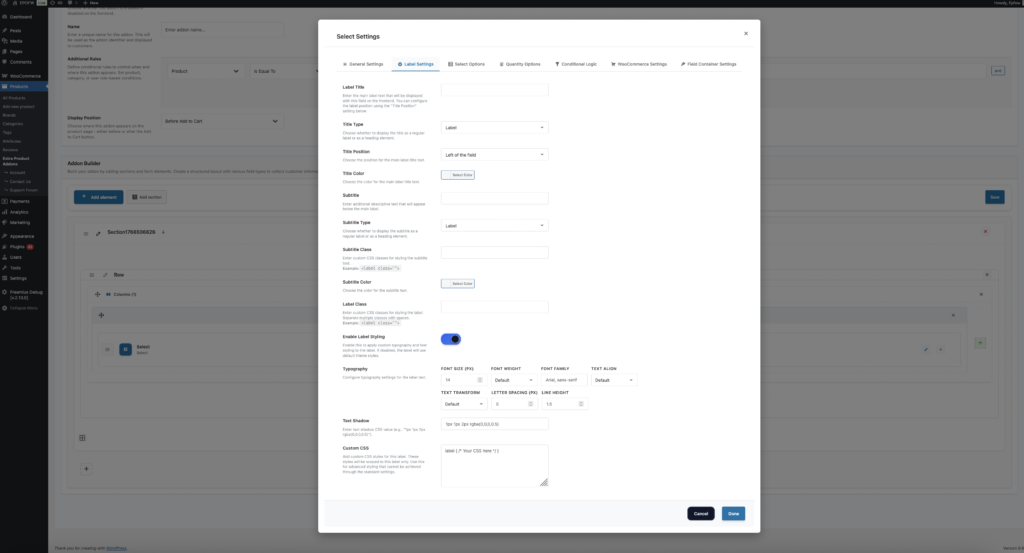
The Label Settings tab controls how the field label (title and subtitle) appears to customers. These settings help you create clear, professional field labels that guide customers effectively.
Label Settings
- Label Title:
- What it does:
- Sets the main label text displayed with the select field on the frontend.
- How to use:
- Enter descriptive text that clearly explains what the field is for
- Keep labels concise but informative
- Use language that matches your product descriptions
- Examples of Effective Titles:
- Label Title: “Choose Your License Type”
- Label Title: “Select Shipping Method”
- Label Title: “Pick a Service Package”
- Best practices:
- Use action words like “Choose”, “Select”, or “Pick” to guide customers
- Make labels specific to avoid confusion
- Match the tone and style of your product descriptions
- What it does:
- Title Type (Premium)
- What it does:
- Determines the HTML element used for the label title (label, h1-h6, span, div, p).
- How to use:
- Label: Standard label element (recommended for most cases)
- Heading (h1-h6): Use for prominent labels that need heading semantics
- Span/Div/P: Use for inline or block-level labels with custom styling
- Best practices:
- Use “label” for standard form fields (most common)
- Use heading elements only if the label serves as a section heading
- Consider SEO implications when choosing heading elements
- What it does:
- Title Position (Premium)
- What it does:
- Controls where the label appears relative to the select field.
- How to use:
- Left: Label appears to the left of the field (default)
- Right: Label appears to the right of the field
- Top: Label appears above the field
- Bottom: Label appears below the field
- Best practices:
- Use “Top” for better mobile responsiveness
- Use “Left” for compact desktop layouts
- Test different positions to see what works best for your design
- What it does:
- Title Color (Premium)
- What it does:
- Sets the text color of the label title.
- How to use:
- Choose a color that matches your theme’s typography
- Ensure sufficient contrast for readability (WCAG AA compliance)
- Use colors that guide attention without being distracting
- Best practices:
- Test color choices on different backgrounds
- Consider dark mode compatibility if your theme supports it
- Maintain consistency across all field labels
- What it does:
- Subtitle
- What it does:
- Adds additional descriptive text below the main label to provide more context.
- How to use:
- Enter helpful information that clarifies the field’s purpose
- Use subtitles to explain pricing, features, or important details
- Keep subtitles concise to avoid overwhelming customers
- Example:
- Subtitle: “Each license includes 1 year of updates and support”
- Subtitle: “Express shipping arrives within 2-3 business days”
- Subtitle: “Premium package includes priority support and advanced features”
- Best practices:
- Use subtitles to highlight value propositions
- Include pricing information when relevant
- Keep text short and scannable
- What it does:
- Subtitle Type (Premium)
- What it does:
- Determines the HTML element used for the subtitle (label, h1-h6, span, div, p).
- How to use:
- Label: Standard label element (recommended)
- Heading (h1-h6): Rarely used for subtitles
- Span/Div/P: Use for inline or block-level subtitles
- Best practices:
- Use “label” or “p” for most subtitles
- Match the subtitle type to your theme’s styling
- Ensure proper semantic HTML structure
- What it does:
- Subtitle Class
- What it does:
- Adds custom CSS classes to the subtitle for styling.
- How to use:
- Enter CSS classes separated by spaces
- Use classes that match your theme’s styling
- Test to ensure proper display
- What it does:
- Subtitle Color (Premium)
- What it does:
- Sets the text color of the subtitle.
- How to use:
- Choose a color that’s slightly muted compared to the main label
- Ensure readability while maintaining visual hierarchy
- Match your theme’s secondary text color
- What it does:
- Label Class
- What it does:
- Adds custom CSS classes to the entire label container.
- How to use:
- Enter CSS classes for styling the label wrapper
- Use classes that match your theme’s form styling
- Apply classes that affect both title and subtitle
- What it does:
- Enable Label Styling (Premium)
- What it does:
- Provides advanced typography and styling options for the label.
- Available Options:
- Font Size: Set the label text size in pixels
- Font Weight: Control text boldness (100-900)
- Font Family: Specify custom font families
- Text Align: Control text alignment (left, center, right, justify)
- Text Transform: Control text case (uppercase, lowercase, capitalize, none)
- Letter Spacing: Adjust spacing between characters
- Line Height: Control line spacing for multi-line labels
- Text Shadow: Add text shadow effects
- Custom CSS: Add advanced custom styles
- How to use:
- Enable “Enable Label Styling” to access these options
- Configure typography settings to match your brand
- Use custom CSS for advanced styling needs
- Best practices:
- Maintain readability with appropriate font sizes
- Use consistent typography across all fields
- Test on different devices and screen sizes
- What it does:
Step 5: Configure Select Options
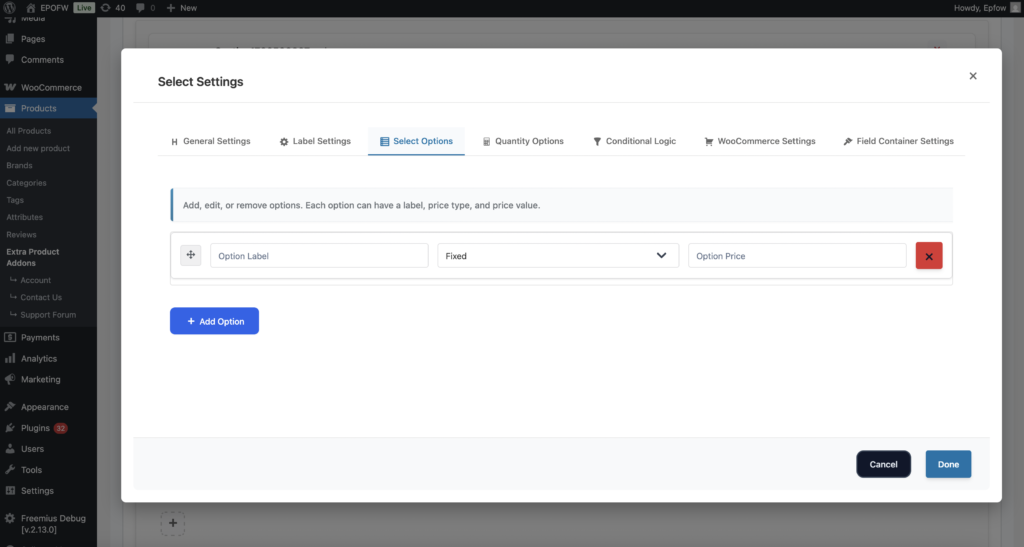
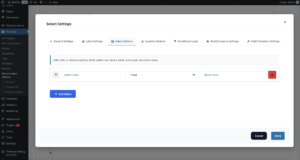
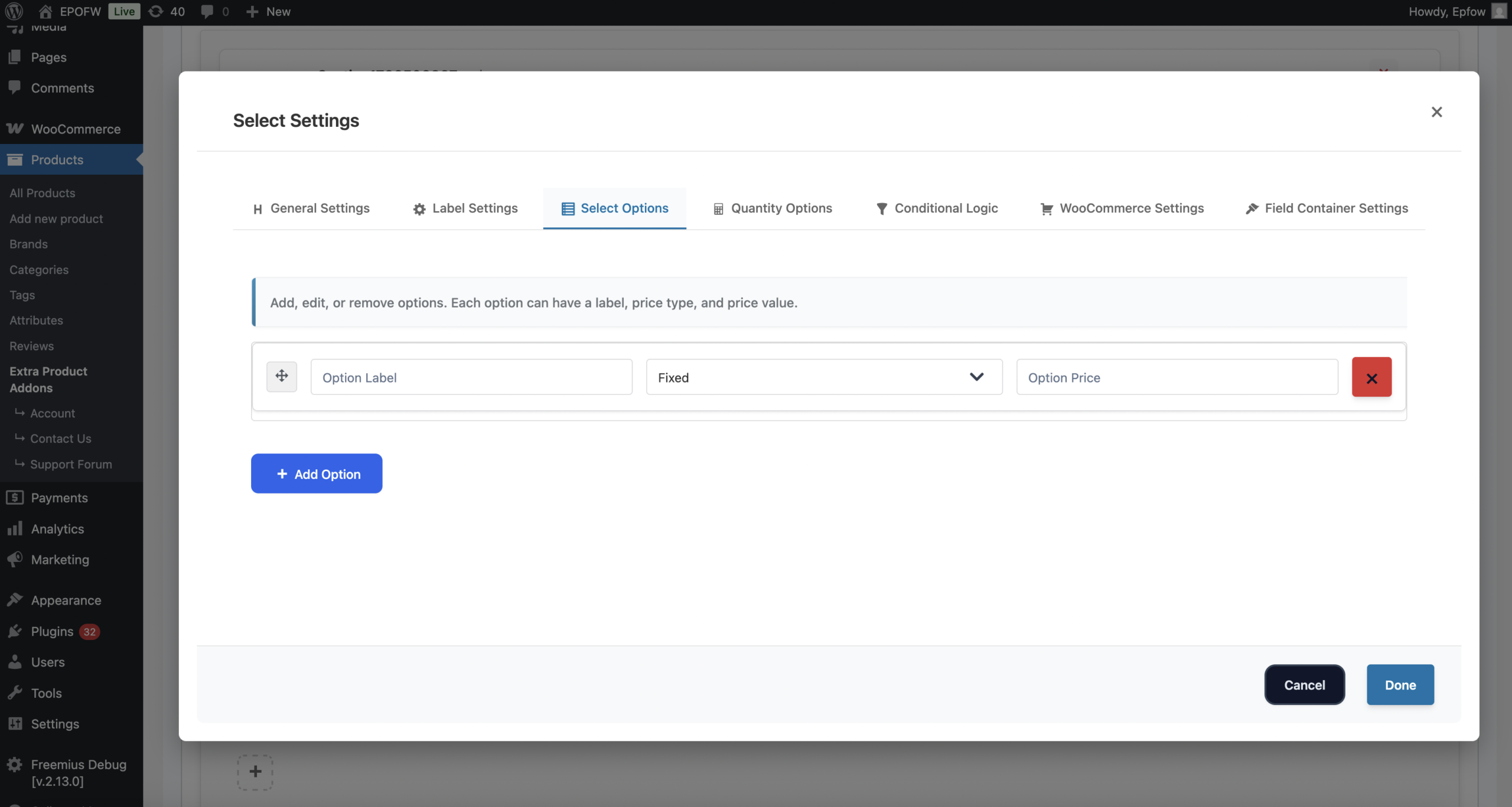
The Select Field’s most important feature is its options configuration. Each option can have its own label and pricing.
Select Options
- Adding Options
- How to use:
- Click **“Add Option”** button in the Options Settings tab
- 2. Enter the option label (what customers will see)
- 3. Select the price type for this option
- 4. Enter the price value
- 5. Repeat for all options you want to offer
- Example Options Setup:
- Software License Example:
- Option 1: Label: “Personal License”, Price Type: Fixed, Price: $29
- Option 2: Label: “Business License”, Price Type: Fixed, Price: $99
- Option 3: Label: “Enterprise License”, Price Type: Fixed, Price: $299
- Shipping Options Example:
- Option 1: Label: “Standard Shipping (5-7 days)”, Price Type: Fixed, Price: $5
- Option 2: Label: “Express Shipping (2-3 days)”, Price Type: Fixed, Price: $15
- Option 3: Label: “Overnight Shipping (1 day)”, Price Type: Fixed, Price: $25
- Service Packages Example:
- Option 1: Label: “Basic Support”, Price Type: Percentage, Price: 5
- Option 2: Label: “Priority Support”, Price Type: Percentage, Price: 15
- Option 3: Label: “Premium Support”, Price Type: Percentage, Price: 25
- Software License Example:
- Option Label
- What it does:
- The text that customers see in the dropdown for each option.
- How to use:
- Enter clear, descriptive labels that customers will understand
- Include important information like pricing, features, or delivery times
- Keep labels concise to fit within the dropdown width
- Best practices:
- Use consistent formatting across all options
- Include pricing information in the label when helpful
- Make labels scannable and easy to compare
- Example Labels:
- “Personal License – $29”
- “Standard Shipping (5-7 days) – $5”
- “Basic Support – 5% of product price”
- What it does:
- Option Price Type : Each option can have its own price type, giving you maximum flexibility:
- Fixed Price
- What it does:
- Adds a fixed amount to the product price when this option is selected.
- How it works:
- Each option has a fixed price that gets added to the product when selected
- The price is added regardless of the base product price
- Perfect for options with set prices
- Example:
- Basic Package: Fixed price of $10
- Premium Package: Fixed price of $25
- Ultimate Package: Fixed price of $50
- When a customer selects “Premium Package”, $25 will be added to the base price.
- Use cases:
- Software license tiers
- Shipping options with fixed rates
- Add-on services with set prices
- Product variations with fixed price differences
- What it does:
- Percentage of Product Price
- What it does:
- Adds a percentage of the product’s base price when this option is selected.
- How it works:
- Each option adds a percentage of the product’s base price
- The percentage is calculated from the current product price
- Perfect for options that scale with product value
- Example:
- Standard Service: 5% of product price
- Priority Service: 15% of product price
- VIP Service: 25% of product price
- For a $100 product, selecting “Priority Service” adds $15 to the price.
- Use cases:
- Service packages that scale with product value
- Warranty extensions based on product price
- Support tiers as percentage of purchase
- Upgrade options proportional to base price
- What it does:
- Fixed Price
- Option Price
- What it does:
- The price value for the selected price type.
- How to use:
- For Fixed: Enter the dollar amount (e.g., 25 for $25)
- For Percentage: Enter the percentage value (e.g., 15 for 15%)
- Best practices:
- Use clear, round numbers when possible for better customer experience
- Test pricing calculations to ensure accuracy
- Display prices clearly in option labels when helpful
- What it does:
- How to use:
- Reordering Options
- How to use:
- Drag and drop options using the move icon (⋮⋮) to reorder them
- Place most popular or recommended options at the top
- Organize options logically (e.g., cheapest to most expensive)
- Best practices:
- Put the most popular option first for better conversion
- Group similar options together
- Consider placing premium options last to encourage upsells
- How to use:
- Removing Options
- How to use:
- Click the remove button (×) next to any option to delete it
- Removed options are immediately deleted from the configuration
- Changes are saved when you save the addon
- Best practices:
- Review options before removing to avoid data loss
- Consider disabling options instead of removing if you might need them later
- Test the field after removing options to ensure proper functionality
- How to use:
Real-World Pricing Examples
See how real businesses use the Select Field in their WooCommerce stores:
Software License Tiers
Set up a Select Field with:
- Field Type: Select
- Options:
- Personal License: Fixed price $29
- Business License: Fixed price $99
- Enterprise License: Fixed price $299
Result:
- When a customer selects “Business License”, $99 is automatically added to the base product price
- The price updates instantly in the cart
- The selected license type is saved with the order
Set up a Select field with:
- Field Type: Select
- Options:
- Standard Shipping (5-7 days): Fixed price $5
- Express Shipping (2-3 days): Fixed price $15
- Overnight Shipping (1 day): Fixed price $25
Result:
- Customers can choose their preferred shipping speed
- The appropriate shipping fee is added to their order
- Shipping method is clearly displayed in cart and checkout
Shipping Options
Service Packages with Percentage Pricing
Set up a Select field with:
- Field Type: Select
- Options:
- Basic Support: 5% of product price
- Priority Support: 15% of product price
- Premium Support: 25% of product price
Result:
- For a $200 product, selecting “Priority Support” adds $30 to the price
- Pricing scales automatically with product price
- Support level is included in order details
What Your Customers See
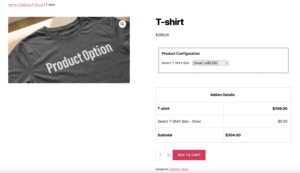
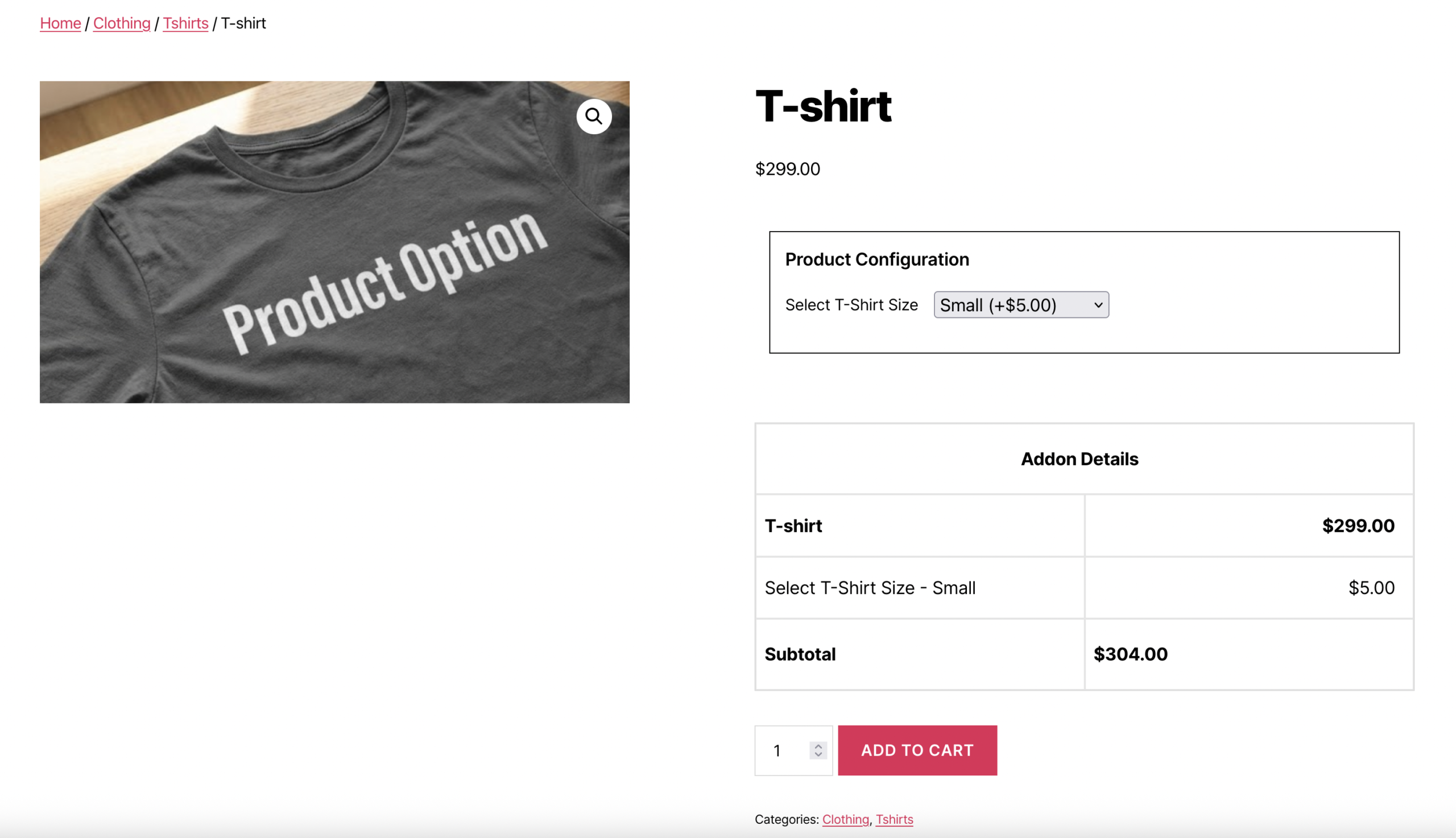
When a customer interacts with your Select Field:
Dropdown Menu: They’ll see a dropdown menu with all available options
Option Labels: Each option displays its label and price (if pricing is enabled)
Selection: They can click to expand the dropdown and see all choices
Price Updates: When they select an option, the product price updates automatically
Cart Integration: The selected option and its price are included in the cart
Frontend Display:
The Select Field appears as a standard HTML <select> dropdown with:
- A “None” option at the top (if field is not required)
- All configured options listed below
- Prices displayed next to each option (if enabled)
- Automatic price calculation when an option is selected
Tips for Creating Effective Select Fields
Creating an effective Select Field involves balancing flexibility with control. Consider these best practices to ensure your select fields provide excellent user experience while collecting high-quality data.
- Option Configuration
- Clear Labels : Use descriptive, easy-to-understand option names that clearly communicate what each option includes
- Logical Ordering: Arrange options from least to most expensive, or most to least popular, to guide customer decisions
- Reasonable Pricing: Set prices that reflect the value of each option and are competitive in your market
- Consistent Formatting: Use consistent formatting across all options (e.g., always include pricing, always include delivery times)
- Label and Display
- Descriptive Titles: Use clear, action-oriented labels like “Choose Your License” or “Select Shipping Method”
- Helpful Subtitles: Add subtitles to explain pricing, features, or important details about each option
- Visual Hierarchy: Use title colors and styling to create clear visual hierarchy
- Mobile Optimization: Test labels on mobile devices to ensure they’re readable and not cut off
- Pricing Strategy
- Transparent Pricing: Make pricing clear and easy to understand
- Value Communication: Use labels and subtitles to communicate the value of each option
- Strategic Positioning: Place premium options strategically to encourage upsells
- Test Pricing: A/B test different pricing structures to find what works best
- User Experience
- Required vs Optional: Only make fields required when the selection is critical
- Default Selection: Consider if a default option would improve user experience
- Error Messages: Provide clear, helpful error messages for required fields
- Loading States: Ensure price updates happen smoothly without jarring transitions
- Performance
- Option Count: While there’s no strict limit, keep options manageable (typically 5-20 options work best)
- Loading Speed: Test with many options to ensure dropdown performance remains good
- Caching: Consider caching for fields with many options on high-traffic products
Advanced Features
- Conditional Logic: Show or hide select fields based on other selections or conditions. Use conditional logic to create dynamic forms that adapt to customer choices, showing relevant fields only when needed. This keeps forms clean and focused while providing comprehensive options.
Free vs Premium
Free Version Includes:
- Basic Select Field functionality
- Multiple options configuration
- Fixed and Percentage pricing per option
- Field-level pricing (Fixed and Percentage)
- Basic label settings
- Required field validation
- Standard dropdown interface
Premium Version Adds:
- Advanced label styling (Typography, Colors, Custom CSS)
- Conditional logic
- Quantity settings
- WooCommerce integration settings
- Row and column layouts
- Field container styling
- Advanced validation options
Troubleshooting
Options Not Displaying
- Check that at least one option is configured in Options Settings
- Verify option labels are not empty
- Ensure the field is enabled (Field Status is ON)
- Clear cache if using caching plugins
- Check browser console for JavaScript errors
Prices Not Calculating
- Verify “Enable Pricing” is enabled in Pricing Settings
- Check that price values are entered correctly (numbers only, no currency symbols)
- Ensure price types are selected for each option
- Test with different price types to isolate the issue
- Check for JavaScript errors in browser console
Field Not Appearing on Frontend
- Verify Field Status is enabled (ON)
- Check that the addon is assigned to the product
- Ensure the addon status is “Published” or “Enabled”
- Verify product rules match (if conditional rules are set)
- Clear all caches (browser, plugin, server)
Selected Option Not Saving
- Verify the field name is unique and valid
- Check that the field is not disabled
- Ensure form submission is working correctly
- Test with different browsers to rule out browser-specific issues
- Check WooCommerce order meta to see if data is being saved
Frequently Asked Questions
Find answers to commonly asked questions about our products and services.
Still have a question?
If you have any other queries, feel free to reach out to us. Our knowledgeable team is here to help!
Conclusion
Select Fields provide a reliable and user-friendly way for customers to choose predefined options on your product pages. Their structured dropdown layout makes them perfect for license tiers, service packages, shipping methods, product variations, and any scenario requiring single-choice selections. Flexible pricing options, clean interface, and seamless integration make the Select Field suitable for simple to complex product configurations, improving customer clarity, ensuring data consistency, and enhancing the overall shopping experience across your WooCommerce store.
With WPActPro, creating dynamic, flexible, and professional select-based customizations becomes effortless for your WooCommerce store.