
Worth ten minutes if you are ever going to explain a date to a customer.
The short version
- Start from today.
- If the order cutoff has passed, start from the next working day instead.
- Count forward Min working days for the earliest date, Max for the latest.
- Skip any day that is not a working day, and any active holiday.
Everything else in this plugin is about which Min and Max to use, and where to show the result.
“Business days” means your days
A business day here is a day you dispatch on, not a generic Monday to Friday.
General → Working schedule is the row of day pills. Highlighted days count. If you ship on Saturdays, highlight Saturday and Saturday becomes a business day.
Holidays that are switched on are removed from that set too, for those specific dates. So the count skips weekdays you have not highlighted and every active holiday, and continues until it has counted enough working days.
A worked example
Min 2, Max 5. Working days Monday to Friday. Today is Monday 7 September, and the cutoff has passed, so counting starts Tuesday the 8th.
| Working day | Date |
|---|---|
| 1 | Tue 8 Sep |
| 2 | Wed 9 Sep ← earliest |
| 3 | Thu 10 Sep |
| 4 | Fri 11 Sep |
| — | Sat 12, Sun 13 — skipped |
| 5 | Mon 14 Sep ← latest |
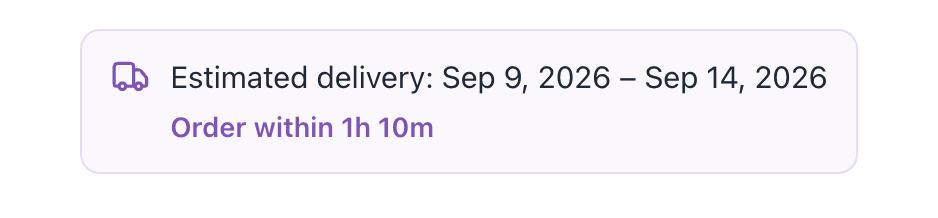
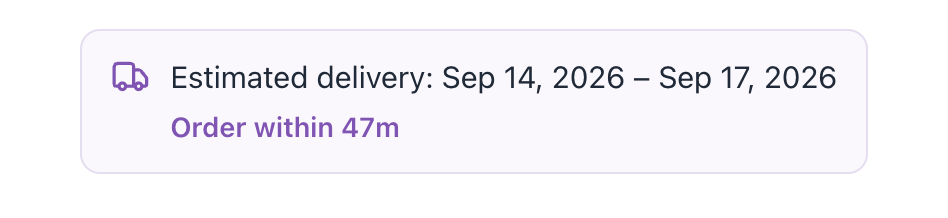
The shopper sees Sep 9, 2026 – Sep 14, 2026. Now close the warehouse on the 9th, 10th and 11th. Those three are removed, the count continues past them, and the same rule produces a later window:
✓ Note
Nothing changed between those two images except the holidays — same product, same rule, same settings.
The cutoff shifts everything by exactly one day
Before the cutoff, counting starts today. After it, counting starts on the next working day — so every date moves forward by one. That is the whole mechanism, and it explains most “the date is one day out” reports.
- It uses your store’s timezone (WooCommerce → Settings → General), not the shopper’s and not your computer’s.
- The countdown shows the time left until that cutoff. Once it passes, the badge switches to Cutoff passed — ships next business day and the date has already moved.
Scheduled start dates
A rule, or a single product, can carry a scheduled start date. When it is set and still in the future, counting begins from that date instead of today.
That is what makes pre-orders honest: a product launching in March shows a March delivery window in January, not a two-day one. Once the date passes, the rule behaves normally again.
What the cart shows
The cart shows one overall estimate for the order, taken from the slowest item — because a date by which only part of an order has arrived is not a promise worth making. A cart total showing a later date than one of its products is therefore correct.
✓ Note
A per-line estimate on each cart row is possible too, but it is off by default and has no setting on screen. See Settings without a screen.
What the order shows
At checkout the estimate is frozen onto the order. Order emails, the thank-you page and My Account all show what the customer was promised at the time of purchase.
Changing your settings afterwards does not rewrite those, and should not — the customer was told a date, and the record of it should survive.
Caching
Calculated dates are cached for up to an hour, so a busy shop does less work per page load.
Saving on the settings screen clears that cache. If dates change some other way — a migration, WP-CLI, an import — press Save changes once, or turn caching off under Advanced while you work.